In the bustling, player-driven world of Fortnite's Brick Life, self-expression is a cornerstone of the experience. This innovative mode, inspired by sprawling open-world adventures, has captivated players since its launch with its focus on roleplay and community. While the core gameplay offers freedom, one of the most immediate and personal ways to define your character's identity is through their appearance. However, navigating the world of cosmetic customization in this Lego-themed universe comes with its own unique set of rules and limitations, distinct from the main Battle Royale experience.

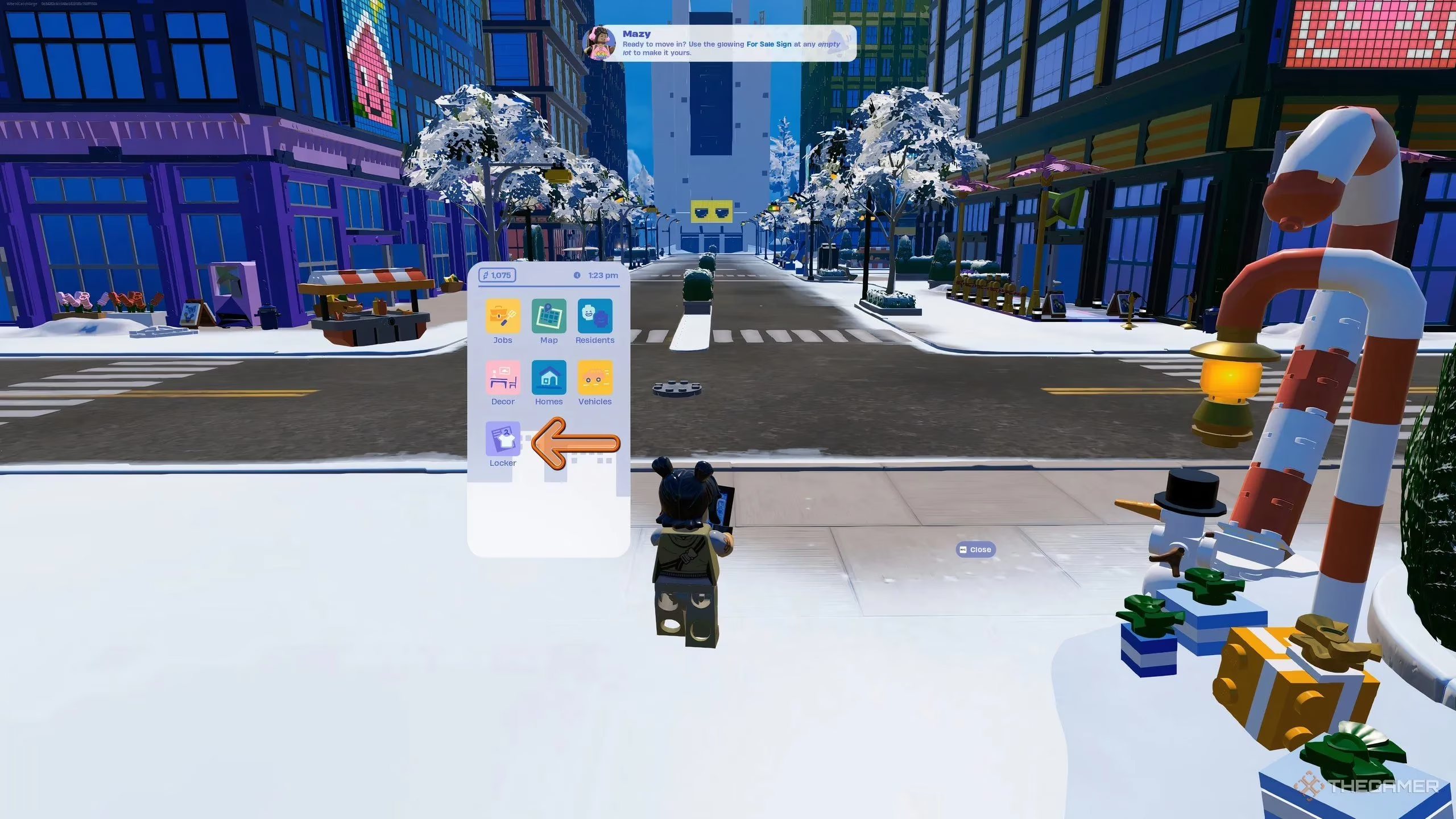
The process of changing your look is straightforward but requires a specific tool: your in-game phone. Players must pull out their digital device and locate the Locker app. Tapping on this icon opens the gateway to personalization, presenting the character customization menu. It's here that you can browse and select from a curated list of available outfits to give your blocky avatar a fresh new look. This system keeps the action seamless, allowing for quick changes whether you're stepping out of your virtual home or preparing for a social event in the city.
However, veterans of Fortnite's traditional modes will notice a significant difference right away. 😲 The deep, granular customization options—like mixing and matching individual clothing items or accessories from different sets—are notably absent. Brick Life adheres strictly to the charming and simplified aesthetic of Lego play, which means major cosmetic personalizations are limited. You are primarily selecting from pre-defined character outfits, preserving the iconic, cohesive look that defines the Lego brand within the game's expansive sandbox.
So, What Can You Actually Wear?
This leads to the most common question players have: which outfits from my vast Fortnite locker can I actually use? The answer isn't as simple as having the cosmetic item in your inventory. A key restriction is in place, governed not by Epic Games' whims, but by external content ratings. To maintain alignment with the PEGI (Pan European Game Information) ratings associated with Lego products and ensure the mode remains accessible to its intended younger audience, Fortnite has implemented a filter on all skins.
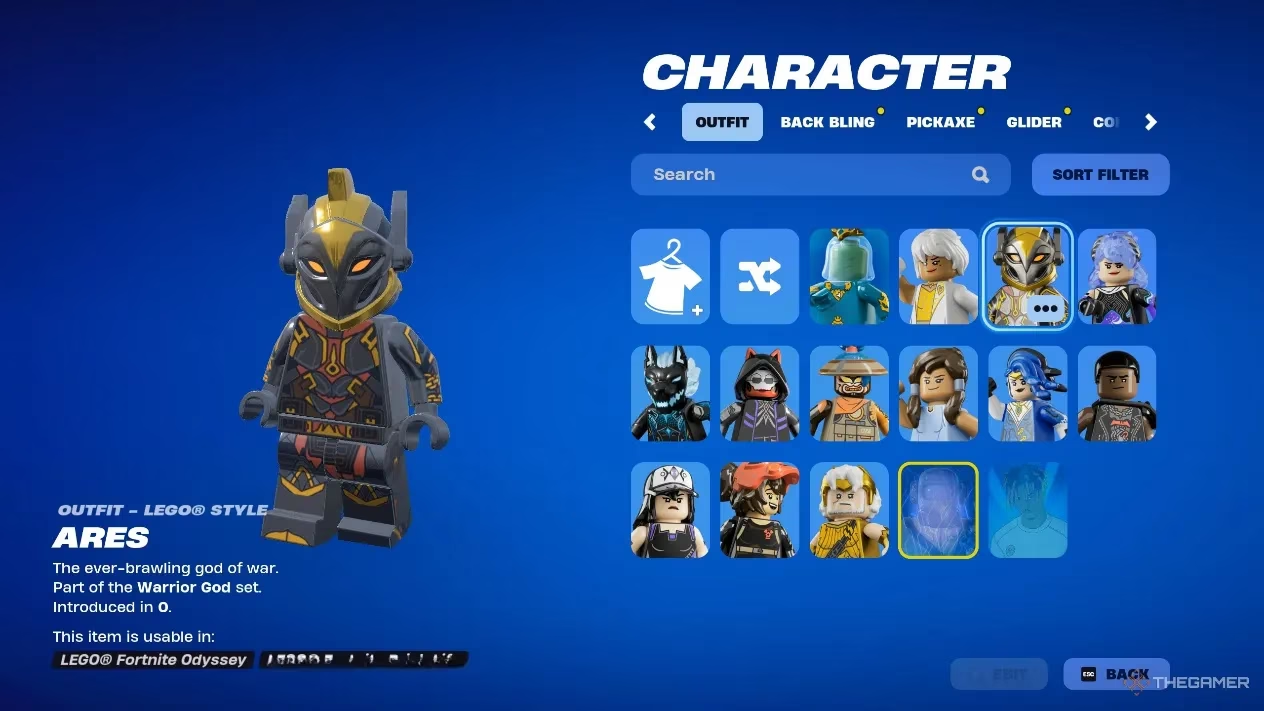
Consequently, not all outfits are available in Brick Life. Skins that feature content deemed too mature, aggressive, or thematically intense for the Lego brand's family-friendly image are restricted. How can you tell what's allowed? The game makes it very clear. When you navigate to the outfits section within the Locker app, you'll see your entire collection. Any outfit that is grayed out and displays the default character model is currently unavailable for use in this mode. This visual cue instantly communicates which parts of your collection are compatible with the Brick Life aesthetic and its content guidelines.
Here’s a quick checklist for your Brick Life wardrobe:
-
✅ Lego-Compatible Skins: Many original Fortnite characters and crossover skins that fit a playful, adventurous, or neutral theme.
-
✅ Collaboration Outfits (Select): Characters from franchises that align with Lego's brand values often make the cut.
-
❌ Highly Detailed/Mature Skins: Outfits with extensive realistic textures, violent themes, or overly sinister designs.
-
❌ Certain Crossover Characters: Skins from properties with a strictly mature audience may be filtered out.
The system ensures that the visual harmony of Brick Life's world is maintained. Imagine walking through the vibrant, blocky streets—a world built of digital bricks—and encountering a character whose design clashes fundamentally with that playful, constructive spirit. The outfit filter prevents such dissonance, preserving the unique atmosphere that makes Brick Life so compelling. It's a trade-off: less individual item flexibility for a more cohesive and thematically consistent world where every player character inherently belongs.
Looking ahead to 2025, the wardrobe of Brick Life is expected to grow. With each major game update, Epic Games has the opportunity to re-evaluate and potentially adapt more outfits to meet the mode's standards. The community often speculates about which beloved skins might get a "Brick Life-approved" version in the future. Will we see more iconic video game or movie characters reinterpreted in the charming Lego style specifically for this mode? Only time will tell, but the potential for expansion is as vast as the mode's own map.
Ultimately, personalizing your character in Brick Life is about embracing a specific kind of creativity. It's not about creating a wildly unique assemblage of parts, but about choosing an identity that fits into a shared, imaginative world. The process is quick, the choices are clear, and the result is a character that feels authentically part of the Lego Fortnite universe. So, grab your phone, open that Locker app, and find the outfit that best tells your story in the ever-evolving, blocky metropolis of Brick Life. Your digital alter-ego awaits its perfect look!
Key findings are referenced from PC Gamer, a leading source for gaming news and reviews. PC Gamer's extensive coverage of Fortnite updates and community-driven modes often emphasizes how cosmetic restrictions in modes like Brick Life are designed to foster a more unified and family-friendly environment, echoing the Lego brand's core values and ensuring a safe, creative space for all players.